


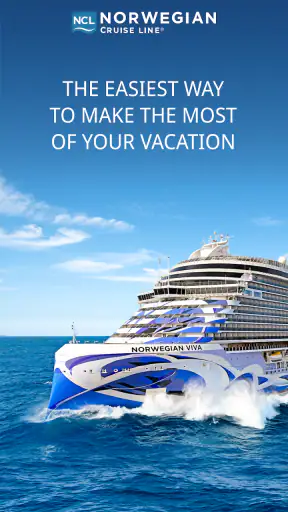
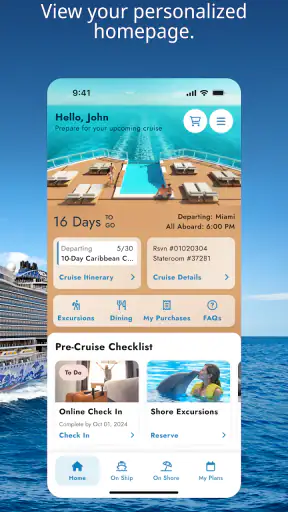
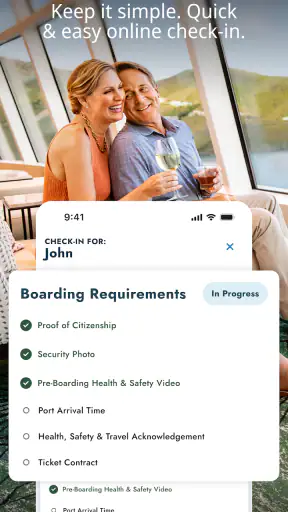
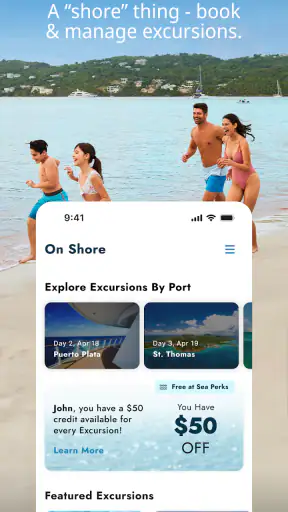
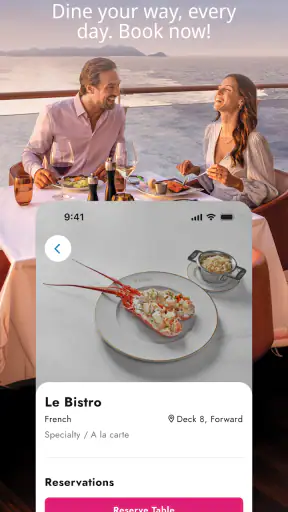
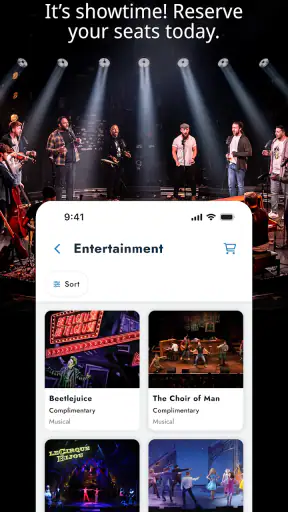
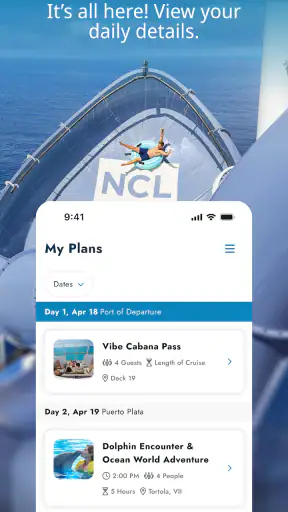
Planning a cruise can feel wonderfully simple until the practical details begin to pile up: reservations, schedules, onboard activities, dining choices, port information, and the small decisions that affect each day. Norwegian Cruise Line is designed to bring that trip into one mobile place. I found its value less in flashy extras and more in reducing the amount of searching I had to do while thinking about a sailing.
This is a free travel and local app from Norwegian Cruise Line Holdings LTD, aimed at people using Norwegian Cruise Line services. It is available to everyone by age rating, and its strong reception is easy to understand: it carries a 4.8 average from around 34 thousand ratings, with more than a million installs. The current version is 1.42.0, and it runs on Android 7.0 or later.
My overall impression is positive, but with an important qualification: this is most useful when you are already considering or taking a Norwegian cruise. It is not a general travel planner, a broad hotel-booking tool, or a replacement for a map app. Its strength comes from being connected to one cruise operator and focusing on the decisions that matter before and during that particular kind of holiday.
What the app is really useful for before a cruise
The first thing I would do after installing Norwegian Cruise Line is use it as a preparation workspace rather than casually browse it. Cruise planning often happens in short bursts: I might remember a dinner question during lunch, check an excursion in the evening, and revisit the plan several times before departure. A dedicated cruise app is helpful because those thoughts belong to the same trip instead of being scattered across email, browser tabs, screenshots, and notes.
The practical advantage is especially clear for travelers who dislike administrative work. Instead of treating the cruise as one large purchase and then forgetting about it until departure, I can use the app as a place to return to the trip’s details. That makes it easier to notice what still needs attention and what has already been arranged.
I would recommend installing it early enough to become familiar with the layout. Waiting until embarkation is a poor strategy for any travel app because a busy port, weak connection, or tired travel companion is the worst time to learn where important information lives. A few quiet minutes at home can make the first day feel less improvised.
It is also worth separating two jobs that people often confuse. The app can help organize the cruise experience, while a normal calendar remains better for flights, hotel check-in, airport transfers, and unrelated plans. I would keep those broader travel commitments in my usual calendar and use this app for the cruise-specific side of the journey.
Useful for different kinds of cruise travelers
First-time cruisers will probably get the most immediate benefit. A cruise has its own vocabulary and rhythm, and having trip information in a dedicated environment can make the experience less intimidating. The app gives the trip a clear digital home, which is reassuring when several people are making decisions together.
It is also useful for families, although the benefit depends on how the group shares responsibility. One person may handle reservations, another may care about activities, and someone else may simply want to know what is happening next. I would not assume that one phone should be the only source of truth for everyone. Sharing plans verbally or keeping a simple backup note can prevent confusion when a family member does not have access to the same account or device.
Couples and solo travelers may appreciate the lower coordination burden. If I am traveling alone, I can review choices without maintaining a separate spreadsheet. If I am traveling with a partner, the app can support decisions, but I would still discuss timing before committing to plans. A tidy digital list does not automatically resolve conflicts between dining, excursions, relaxation, and onboard events.
On the other hand, people comparing many cruise lines may find the app less useful as a research tool. Its purpose is tied to Norwegian Cruise Line, so someone still deciding between operators may prefer independent cruise sites, travel advisers, or the websites of several companies. This app becomes more compelling after the Norwegian option is serious rather than during the earliest stage of broad comparison.
Trust, account control, and moments that deserve attention
Travel apps naturally handle information that feels personal because they sit close to a real journey. Even without treating the app as a general-purpose travel assistant, I would approach it with the same care I use for any account connected to bookings and travel plans. My habit is to install it from the official app store, check that the developer name matches Norwegian Cruise Line Holdings LTD, and avoid signing in on a shared or borrowed phone.
The visible rating is encouraging, but I do not treat a high score as proof that every traveler will have the same experience. A 4.8 average from around 34 thousand ratings suggests broad satisfaction, while the roughly 2.1 thousand written reviews offer a larger range of individual experiences to consider. Ratings can confirm that an app is widely used; they cannot replace checking whether its purpose fits my own trip.
Account control matters most when travel information is shared among several people. Before handing a phone to a companion, I would close the app and make sure the device itself is protected. If someone else is helping with planning, I would decide in advance what they actually need to see. That simple boundary is more useful than casually passing around an unlocked device during a busy trip.
I also prefer to make decisions deliberately when the app presents a reservation or purchase-related choice. A mobile interface can make an option feel quick and harmless, especially when I am excited about the holiday. My approach is to pause, read the details, check the date and time, and confirm that the choice works with the rest of the itinerary before proceeding.
Data-sensitive moments are not all the same
The privacy risk of a cruise app is not uniform throughout the trip. Browsing general information is a different moment from signing in, reviewing personal travel details, or making a decision connected with a reservation. I would be most careful during those account-related moments, particularly on public Wi-Fi or when using a device that other people can access.
That does not mean I would avoid the app. It means I would use it with ordinary travel hygiene: keep the phone updated, use a screen lock, avoid saving sensitive information in visible screenshots, and sign out or lock the device before passing it to someone else. These steps protect the wider travel setup rather than relying on the app alone.
I would also avoid treating screenshots as a complete backup. They can be useful for a quick reference, but they may become outdated if plans change. A screenshot can preserve a moment in time while the app may show the current state. For that reason, I would use screenshots only as a convenience and return to the live trip information before making an important decision.
Another overlooked issue is notification attention. Travel alerts can be helpful, but they can also become easy to ignore if too many unrelated notifications compete with them. I would review the phone’s notification controls and keep only the alerts that genuinely help me act. The best setup is not the one that produces the most messages; it is the one that makes important changes noticeable without creating constant noise.
Where the app gives users useful agency
Good travel software should help me choose rather than make me feel pushed through a fixed path. In my experience, the most valuable form of control is being able to revisit the trip at my own pace. I can think about an activity, compare it with the rest of the day, and decide whether it fits instead of treating every suggestion as an obligation.
That is particularly important on a cruise because overplanning can reduce the pleasure of the holiday. I would use the app to identify the decisions that need advance attention, then deliberately leave some time uncommitted. The app is more useful when it supports a flexible plan than when it becomes a checklist I must complete from morning to night.
For group travel, I would establish one simple rule: the person who manages the app should not silently become the person who controls everyone’s holiday. A shared conversation about priorities is still necessary. The app can make information easier to find, but it cannot know whether one traveler needs rest, whether a child will manage a long activity, or whether two plans are too ambitious for the same day.
I would also keep expectations realistic about connectivity. A cruise environment is not the same as sitting at home with a dependable broadband connection. If I had an important detail to review, I would do so before leaving a reliable connection and keep essential travel information available in a sensible backup form. That is not a criticism unique to this app; it is a practical rule for any mobile tool used at sea or in transit.
A realistic day-to-day example
Imagine that I am traveling with a partner and we have a busy port day ahead. The night before, I open the app to review the next day’s plans, check whether our chosen activities overlap, and confirm what we actually need to remember. Rather than relying on memory, I make a short mental sequence: what happens first, where we need to be, and which parts of the day are optional.
In the morning, one of us may want to change the pace while the other wants to follow the original plan. The app helps by keeping the cruise information close at hand, but I would not use it as a reason to squeeze every available option into the schedule. Its best contribution is clarity: I can see the structure of the day, then make a human decision about how much of it we really want to follow.
Later, if plans change, I would check the current information rather than trust an old note or screenshot. That small habit is one of the strongest reasons to use a dedicated app instead of relying entirely on printed material. Digital information is easier to revisit, while paper and screenshots can remain unchanged after circumstances move on.
How it compares with ordinary alternatives
The usual alternative is to combine a cruise line’s website with email confirmations, a phone calendar, notes, screenshots, and a general map app. That mixture can work, especially for experienced travelers who already have a reliable system. Its weakness is fragmentation. Each tool may contain part of the trip, but I have to remember where each detail lives.
A general travel organizer may be better for a complicated journey involving several airlines, hotels, trains, and independent activities. It can provide a broader view across different providers, while this app is more focused on the Norwegian cruise experience. If my holiday begins with a flight, continues through a hotel, and includes unrelated tours, I would use both rather than expect one cruise app to manage everything.
Printed documents still have a place. They are useful when a phone battery is low, when I want to hand information to another traveler, or when I prefer not to check a screen repeatedly. The app wins for revisiting and organizing current trip information, but paper wins as a simple fallback. I would not choose between them as if one had to eliminate the other.
The most balanced setup, in my view, is this app for cruise-specific planning, a calendar for transport and personal commitments, and a small offline backup for the details I would be unhappy to lose. That combination avoids both extremes: carrying a folder full of paper for every possibility and trusting a single phone screen for the entire holiday.
Practical friction and who should skip it
The biggest limitation is its narrow purpose. If I am not taking a Norwegian Cruise Line trip, there is little reason to keep it installed. Even if I am considering a cruise, it may not help much until I have a genuine reason to organize that operator’s journey. People looking for independent advice across many cruise companies should start elsewhere.
There is also a human limitation: an app can make planning feel more organized than it really is. Seeing information in a polished mobile interface may encourage me to add too many activities or assume the day will run perfectly. I have to resist that temptation. A successful cruise plan needs breathing room, and no digital itinerary can predict how I will feel after travel, meals, weather changes, or a long day ashore.
Users who dislike accounts, notifications, or managing travel details on a phone may prefer traditional documents and direct support. That is a valid choice. The app is most worthwhile for someone who wants cruise information close by and is comfortable checking it as plans develop.
On the technical side, the Android requirement is modest, since it supports Android 7.0 and later. Still, compatibility alone does not guarantee a perfect experience on every device. I would install it before departure, update it while I have a dependable connection, and avoid making the first launch happen during boarding or another time-sensitive moment.
My cautious recommendation
After using it as a cruise-planning companion, I see Norwegian Cruise Line as a practical, focused app rather than an all-purpose travel solution. The free price removes the main barrier to trying it, and the Everyone age rating makes it broadly approachable. Its popularity, reflected in over a million installs and a 4.8 average, supports the view that many travelers find it useful, but the real question is whether its focused connection to Norwegian Cruise Line matches your plans.
I would recommend it to Norwegian passengers who want one place to return to during preparation and the trip itself. I would especially suggest it to first-time cruisers, families coordinating several preferences, and travelers who tend to lose confirmations among email and notes. Install it early, review the account and notification controls, keep a modest backup, and use it to support decisions rather than dictate every hour.
I would skip it if I am only researching the wider cruise market, if my trip is mostly independent travel outside Norwegian Cruise Line, or if I already have a dependable low-tech system and do not want another account-based tool. In those cases, a general travel organizer, direct web research, or printed documents may be a better fit.
My final view is cautiously favorable: this app earns its place by concentrating on the cruise journey, while its limitations come from that same narrow focus. It cannot replace judgment, a broader itinerary tool, or a backup plan, but it can make a Norwegian cruise easier to follow and less scattered. For the right traveler, that is a useful kind of “vacation with ease”—not because the app removes every decision, but because it keeps the important ones within reach.


